


Happy Color®: Color by Number
4.6400.06K Reviews
App Specs
- Version
- 2.22.6
- Updated On
- License
- Free
- Downloads
- 100,000,000+
- Developer
- X-FLOW
- Categories
- Board
- Platform
- Android, iOS
Screenshots



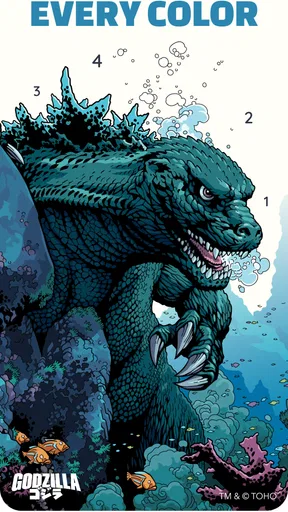


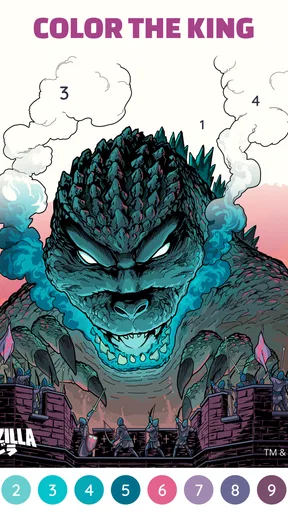

 Analysis by AppCompare
I like Happy Color®: Color by Number best as a low-pressure way to fill a spare moment, not as a substitute for drawing or painting. Its appeal is straightforward: choose an illustration, follow the numbered spaces, and watch a picture take shape without needing art supplies or any particular skill. I find that simple loop genuinely calming, though it can become repetitive if I want more creative control.
That balance makes it easier to recommend to some people than others. If you enjoy gentle, structured activities and like seeing a finished image emerge a little at a time, it is an inviting option. If you want to sketch freely, mix your own colors, or work toward a challenging game objective, you may be happier with a different kind of app.
Why the simple coloring loop works
The first thing that struck me about Happy Color® is the sheer variety of images available to color. From intricate mandalas to adorable animals, the app boasts thousands of illustrations. Trust me, there's something for everyone here, whether you’re a seasoned artist or someone who just loves to doodle.
The interface is incredibly user-friendly. Seriously, even my tech-challenged aunt could navigate it with ease. You simply select a picture, and the app guides you through the coloring process with numbers corresponding to specific colors. It's like painting by numbers, minus the mess of spilled paint and stained clothes.
That guided approach is also the key trade-off. The numbers make it easy to begin without planning a composition, but they leave little room to choose how the finished picture looks. I wouldn’t pick this when I’m in the mood to invent an image from scratch. I would pick it when I want a clear task that doesn’t ask me to make many decisions.
A useful reset, with a few caveats
One of the standout features of this app is how truly relaxing it is. I kid you not, coloring in this app feels like a mini-vacation for your mind. The rhythmic tapping of coloring each section becomes almost meditative. It’s the perfect way to unwind after a long day or during a break from work.
Plus, the app's developers have clearly put thought into the color palette. The shades are vibrant and pleasing to the eye, making the final masterpiece even more satisfying to look at. It’s like instant gratification, with a splash of creativity.
Worth Reading Before You Choose

Baby Panda World Brings Quick Play to Modern Phones, but Its Game Library Feels Busy

ESPN’s Live Game View Makes Following Close Games Easier

QuizzLand Review: A Good Fit for Short Trivia Breaks, Not Every Player

Basketball Stars: Multiplayer Is Fast, but Can It Recover When Matches Go Wrong?

WEBTOON Turns Phone Updates Into a Better Reading Routine

Link to Windows Runs on Shared Habits, Not Social Feeds
For me, the best everyday use is a short pause that has a natural stopping point: I can color for a few minutes while waiting for an appointment, then put my phone away without needing to remember a complex game state. On a tired evening, I might choose a picture and work through a few numbered areas rather than open a fast-paced game that demands quick reactions. That does not mean every image is equally restful; a dense illustration can turn a quick break into a longer session, so I choose a simpler-looking picture when I want to keep the activity brief.
There is a small but meaningful difference between this and coloring on paper. The digital format avoids buying supplies, clearing a table, and worrying about mistakes, which makes starting almost effortless. But it also replaces the feel of pencils or markers with tapping on a screen. If the tactile part of coloring is what you love most, a physical book will probably feel more satisfying.
Content, discovery, and a sensible routine
What keeps me coming back to Happy Color®: Color by Number are the delightful features that make each session exciting. The app frequently updates its library with new pictures, so I never run out of fresh content to explore. It’s like having a subscription to an endless coloring magazine!
Moreover, the app offers themed collections. For instance, during the holidays, you can dive into seasonal images that capture the spirit of the occasion. Who wouldn’t want to color a spooky Halloween scene or a cozy Christmas landscape?
When I’m choosing what to color, I treat the library like a menu rather than a queue I have to clear. A themed collection is a good place to start when I want a picture that fits the mood, while browsing more broadly suits a day when I’m not sure what I want. I also find it useful to stop after completing a picture instead of opening another automatically; that keeps a relaxing break from quietly turning into a long stretch of screen time.
The app’s paint-by-number structure compares well with ordinary digital coloring books when the goal is to get a polished result without needing to decide which shade belongs where. A freeform drawing app is better for experimenting, learning to sketch, or making something personal. A traditional board game, meanwhile, gives you rules, choices, and often another person to play against; this is a solitary, slower activity. I’d choose based on the kind of attention I have to give, not on which format is universally better.
One practical question is whether the numbered method is suitable for someone who does not think of themselves as artistic. In my view, yes: the guidance makes the starting point clear, and the task is more about noticing and filling the indicated areas than drawing accurately. Someone seeking a lesson in color theory or technique should look elsewhere, since following numbers is not the same as practicing those skills.
Who will enjoy it—and who may not
I’d recommend this to adults who want a quiet, approachable pastime, as well as to families looking for an easy activity to explore together. The game is rated Everyone, and its rules are simple enough to explain quickly. A parent can still decide whether the screen time and in-app purchases fit their household’s preferences. The experience is also a reasonable choice for people who like completing small tasks: each filled section offers visible progress without requiring a long session.
It is less suited to anyone who finds repetitive tapping irritating, wants competition or complex strategy, or expects every session to feel dramatically different. The basic interaction remains coloring numbered sections, so the appeal depends on enjoying that repeated action. People with a strong preference for unrestricted art tools may feel boxed in by the preset colors and image design.
Another point to consider is spending. The game is free to download, with in-app purchases ranging from $1.99 to $7.99 per item. I would start by seeing whether the free experience suits my habits before buying anything. These purchases may be convenient for someone who already knows they want them, but they are not a reason to install the app if the core coloring loop does not appeal.
X-FLOW is the developer behind the game, which has a 4.6 average from around 3.8 million ratings and over 100 million installs. Those figures suggest broad reach, but popularity alone is not a guarantee that the format will click for you. I’d use the first few sessions to judge the pace and image style for myself rather than assume a widely played game must become a personal favorite.
What to expect before installing
The game was released on January 24, 2018, and its current version is 2.21.3. It requires Android 6.0 or later. Those details are worth checking against your device before you install; the game is free to get, but the optional purchases are separate. I would also think about when I’m likely to use it: its strongest role is as a calm, focused activity, not something I’d open when I need hands-free entertainment or want to look away from my phone.
If you are wondering whether it works for a very short break, I think it can, provided you pick an image that does not feel overwhelming and are comfortable stopping mid-session. If you want a complete sense of progress, finishing one picture is more satisfying than jumping between several. That small choice helps the game feel like a deliberate pause rather than another endless feed to scroll through.
For someone choosing between this and another coloring app, I’d focus on whether guided coloring is the point. Here, the numbered structure reduces friction and makes the result feel attainable. If comparing options, look for the style of interaction you actually want: guided fills for an easy wind-down, open-ended tools for creative freedom, or a paper book for a hands-on experience. I would not treat the largest image library or the most elaborate interface as automatically best; a comfortable pace matters more for this kind of pastime.
A pleasant choice for the right kind of break
If you’re searching for a stress-reliever that also nurtures your creative side, look no further. Happy Color® is a delightful app that offers endless hours of entertainment and relaxation. Whether you're looking to kill time on your commute or wind down before bed, this app is the perfect digital companion.
I’d soften that recommendation for anyone who is sensitive to screen use before bed or prefers activities with more active decision-making. Coloring can be soothing, but it is still time spent on a phone, and the repeated taps may not be relaxing for every person. For those users, a paper puzzle, a book, or a more hands-on hobby could be a better way to switch off.
My verdict is that this is an easy game to try if a structured coloring session sounds appealing. It removes the intimidating blank page and makes it simple to return for a few minutes, while its limited creative freedom and repetitive input are real drawbacks rather than hidden surprises. I’d recommend it to someone who wants a calm, guided activity and suggest skipping it if they want to make art on their own terms or play a more strategic board game.
So go ahead, download it, and immerse yourself in the world of color. Trust me, your inner artist will thank you.
Pros
- Extensive color palette available.
- Intuitive user interface.
- Regular updates with new images.
- Offline mode for coloring anywhere.
- Relaxing and stress-relieving experience.
Cons
- Contains in-app advertisements.
- Limited free content.
- Occasional app crashes reported.
- Requires internet for updates.
- Some images locked behind paywall.
FAQs for Happy Color®: Color by Number
What is Happy Color®: Color by Number?
Happy Color®: Color by Number is a digital coloring app available on Android and iOS that allows users to create art by coloring in pre-drawn illustrations using a number-based system. It offers a wide range of artwork across various categories, making it a relaxing and engaging experience for users of all ages.
Is Happy Color®: Color by Number free to use?
Happy Color®: Color by Number is free to download and use, but it offers in-app purchases. These purchases can include additional coloring pages, ad-free experiences, or special features. Users can enjoy the majority of the app's content without spending money, but some premium options might enhance the experience.
Does Happy Color®: Color by Number require an internet connection?
While Happy Color®: Color by Number can be used offline for coloring saved images, an internet connection is needed to download new coloring pages and access some features. Staying connected ensures you get the latest updates and new artwork, enhancing your overall experience with the app.
Is Happy Color®: Color by Number suitable for children?
Yes, Happy Color®: Color by Number is suitable for children, as it features a user-friendly interface and a wide range of family-friendly illustrations. However, parents should be aware of in-app purchases and advertisements. Supervising younger users can ensure a safe and enjoyable coloring experience.
How can I save and share my completed artwork in Happy Color®: Color by Number?
After completing a coloring page in Happy Color®: Color by Number, you can easily save your artwork to your device. The app provides options to share your creations on social media platforms or with friends directly. This feature allows you to showcase your artistic achievements and engage with a community of coloring enthusiasts.


